AI Agent for Content Creators
Every other AI agent platform was designed for developers. NanoChan was designed for everyone else. Download, unzip, and your AI is live — chat with it from Telegram on your phone, browser, or desktop. No setup. No terminal. No technical knowledge needed.
macOS & Linux support coming soon
See How It Works
Why NanoChan?
Other AI Agent Tools Were Built for Developers.
NanoChan Was Built for Everyone.
Tools like OpenClaw and Hermes are powerful — but using them requires Python environments, config files, and terminal commands. NanoChan removes all of that.
✕ The Old Way
✕ Install Python 3.10+ and configure a virtual environment
✕ Hand-edit YAML or JSON configuration files
✕ Start your agent by running terminal commands
✕ Hard-code API keys directly into text files
✕ Debug cryptic error messages in the command line
✕ Redo the entire setup on every new machine
✓ The NanoChan Way
✅ Download a ZIP — no Python, no installs, nothing else
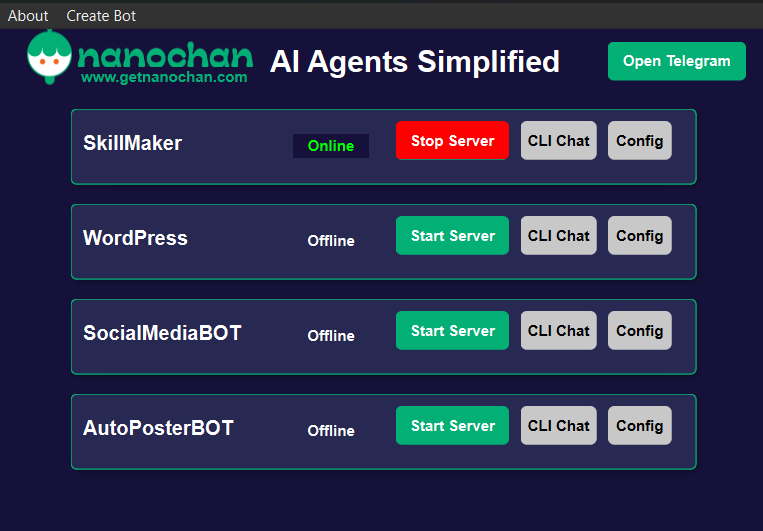
✅ Set up everything through a clean visual dashboard
✅ Click "Start Server" — one button, your agent is live
✅ Enter API keys once through a secure on-screen form
✅ Green dot = running. That's all you need to know
✅ Portable — move the folder to any Windows machine and run
Core Features
Everything You Need. Nothing You Don't.
NanoChan wraps the complete NanoBot feature set in a clean GUI. No compromises. No Technical Setup needed. All complicated stuffs are dealt with.
🤖
Multi-Agent Dashboard
Run multiple specialized AI agents simultaneously from one screen. A WordPress assistant, a social media manager, a research bot — all managed from a single interface.
⚡
100+ LLM Providers
Connect to OpenAI, Anthropic, Google Gemini, DeepSeek, Groq, Ollama for private local models, and over 100 more. Bring your own API key. Swap providers anytime.
💬
Chat via Telegram
Your agents live in Telegram. That means your AI is one message away — from your phone on the go, from any browser, or from the Telegram desktop app at home.
🧩
Expandable Skills
Install Premium Skills from our NanoChan Plus plan and get access on Skills perfect for ALL content creators. Our content creation focus Skills are designed to make any workflow efficient.
🧠
Persistent Memory
Your agents remember every conversation. NanoChan builds long-term memory so your AI learns your preferences, projects, and working style over time.
🎙️
Voice Message Support
Send voice notes via Telegram instead of typing. NanoChan transcribes your message automatically and responds — perfect when you're on the move.
📅
Scheduled Automations
Set tasks to run daily, weekly, or on any custom schedule — morning briefings, reports, reminders.
🔍
Web Search & Research
Your agent searches the internet and reads web pages in real time to answer questions and gather information.
⚙️
Background Sub-Agents
Spawn specialized agents to handle complex multi-step tasks in the background without blocking your chat.
🌐
MCP Tool Integration
Connect external tools and services via the Model Context Protocol — extending what your agent can do.
🔒
Runs Locally
NanoChan runs entirely on your machine. Your conversations go directly to your AI provider — no middleman.
🔍
Web Search & Research
Your agent searches the internet and reads web pages in real time to answer questions and gather information.
Pricing
Start Free. Grow When You're Ready.
NanoChan Core gives you the full platform at no cost. NanoChan Plus will bring premium built-in skills designed for all types of Content Creators.
NanoChan CORE
FREE
Everything you need to run powerful AI agents on your Windows PC. No credit card. No trial period.
✓ Full NanoBot AI engine
✓ 100+ LLM provider support
✓ Telegram integration
✓ Unlimited agents
✓ Long-term memory & voice notes
✓ Web search & scheduled tasks
✓ Community skills
✓ Windows — v1.0
macOS & Linux coming soon
NANOCHAN PLUS
TBA
Premium skills for Content Creation and many more and one-click installation for the most powerful agent workflows.
✓ Everything in Core
✓ Premium built-in skills
✓ Priority support
✓ Early access to new features
✓ Advance Features
✓ Access to Full Guides and Workflow process
No spam. Just a heads-up when it launches.
FAQ
Common Questions
Do I need to install Python or any other software?
No. NanoChan is a fully self-contained Windows application. Download the ZIP, extract it, and double-click to launch. There is no Python runtime to install, no Node.js, no package manager — nothing else required.
How does chatting through Telegram work?
When you create an agent in NanoChan, you connect it to a Telegram bot (a free Telegram feature). From that point, you chat with your AI through that bot — via the Telegram app on your phone, Telegram Web in any browser, or the Telegram desktop app. NanoChan runs on your PC in the background and handles all the AI processing.
Which AI LLM Model to use?
NanoChan supports over 100 providers including OpenAI (GPT-4o), Anthropic (Claude), Google (Gemini), DeepSeek, Groq, Ollama for running fully local private models, and many more. You connect your own API key via OpenRouter — NanoChan never stores or transmits your credentials anywhere.
Is my data private?
Yes. NanoChan runs entirely on your local machine. Your conversations travel directly from your PC to your chosen AI provider — there are no NanoChan servers relaying your messages. If you use Ollama with a local model, nothing leaves your machine at all.
What are Skills and can I build my own?
Skills are specialized capability sets that give an agent a specific focus — like a WordPress manager or a social media assistant. NanoChan ships with a visual SkillMaker tool so you can build custom skills without writing code. NanoChan Plus will add a curated premium marketplace.
When will macOS and Linux be available?
macOS and Linux support are actively in development. Download NanoChan Core for Windows today — you'll be the first to know when additional platforms launch.